
To demonstrate your student’s active participation in the program, they’ll be asked to submit a weekly learning log – a short summary of what they learned throughout the week.
Learning logs are an easy-to-manage accountability tool, demonstrating the hard work that your student is putting into the subjects listed on their education plan.
Each week, your student’s teacher will review their learning log and send back some supportive feedback.
How and when to submit your logs:
View all 26-27 learning log due dates here.
Learning logs can be submitted anytime during the week.
You can access each learning log up to 21 days before it’s due.
Each log will be due on the following Monday by 11:59 PM.
We strongly encourage students to submit their own learning logs by logging into the platform themselves, but you can also submit the log for your student if necessary.
How To Submit A Learning Log
In your OpenEd platform, head to the Learning Logs tab.
You can manage all of your students' learning logs from this page.
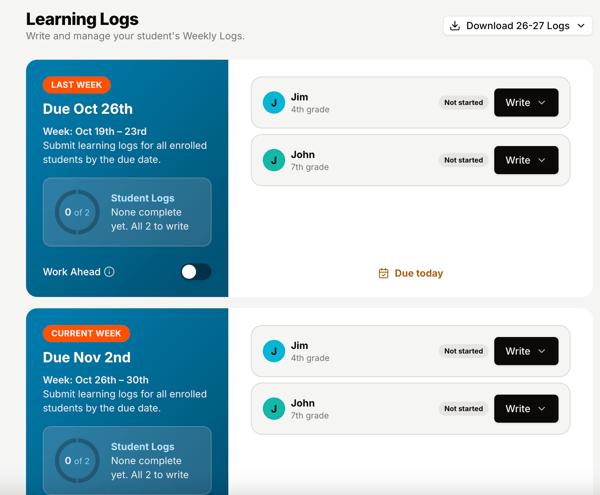
Your student will be asked to give a brief 3-5 sentence summary of what they learned this week.
They’ll also be asked to check off which required subjects from their education plan that they participated in.
All of these subjects will be checked off by default, so if your student participated in all of their subjects, they don’t have to do anything!
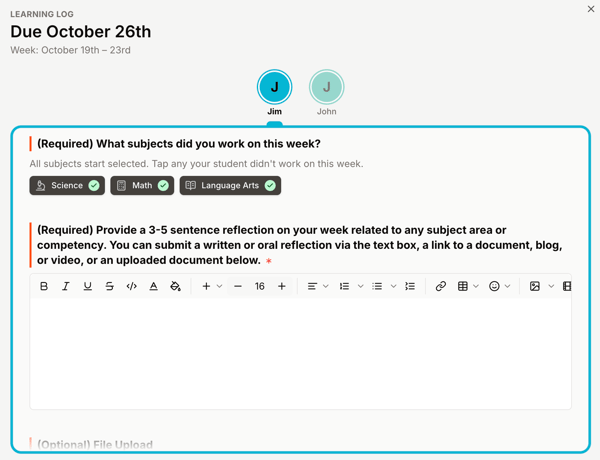
OpenEd requires that all students submit a unique reflection for each learning log. This process makes sure that your student's logs accurately demonstrate their participation in the program.
Keep in mind: An agenda or list of learning won't count as a reflection unless it's accompanied by a brief explanation.
If your student wants to, they can share some photos or work samples from the week with their teacher – but this is totally optional.
Your student's teacher will grade their learning log by one week after the log's due date.
Learning Log Statuses
You’ll see a few different statuses on your student’s learning logs.
Here’s a quick guide on what they mean:
- Action Required: Your student’s learning log is overdue . Please submit it as soon as possible.
- Completed: Your student’s teacher has graded this log as complete. You’re all set!
- Draft: The learning log hasn’t been submitted yet. Any changes your student makes will be automatically saved.
- Excuse Requested: You’ve requested this log as excused, but your student’s teacher hasn’t approved the excuse yet. (Once they do, the status will change to “Completed.”)
- Excused: Your student’s teacher has approved your request to excuse this learning log.
- Submitted: The learning log has been submitted to your student’s teacher, but it hasn’t been graded yet.
Requesting A Learning Log As Excused
Please note that students can only have:
- A maximum of two excused logs per semester
- A maximum of four total excused logs per school year
Additionally, students can't request more than two excused logs in a row.
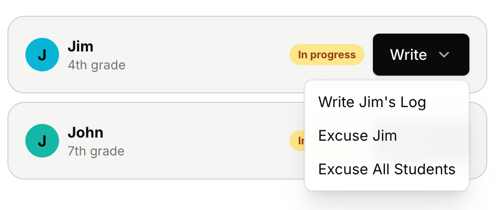
When you click the Write button on a learning log, you'll see the option to request that log as excused.
How Learning Logs Affect Enrollment
For your student to stay enrolled in good standing in the program, they’ll need to submit all of their learning logs.
Our team is invested in your student’s progress – we want them to succeed! If your student has a missing or incomplete log, our interventions team might reach out to see how we can help.
If your student’s logs are consistently late or incomplete, they might be at risk of being withdrawn from the program.
Stay informed: Review our Withdrawal/Repayment Policy for students who withdraw before the end of the school year.
Learning Log FAQs
Q: What if my student didn’t work on one of their subjects this week?
A: If your student unchecks a subject, they’ll be asked to explain why they missed that subject for the week. This info is just for your teacher’s reference – as long as your student’s learning log is submitted with their reflection, it will still count.
Q: What if my family goes on vacation?
A: Vacations can be an awesome time to learn! We encourage students to include what they learned while on vacation in their weekly learning logs. If you prefer to work ahead before you go, you can also submit logs up to three weeks early.
Q: Do I need to submit a learning log over school breaks?
A: Nope! Learning logs won’t be due over any school breaks noted on your program’s calendar. You can see the due date for each learning log in the log’s title. Take a look at our Key Dates article to review your school breaks.