
To demonstrate your student’s active participation in the OpenEd program, they’ll be asked to submit a daily attendance response through our platform.
Submitting daily attendance:
- Ensures that your child is meeting Texas public school requirements
- Helps their teacher know when extra support might be needed
How to Submit Attendance
Submit By Text
Every morning, you'll receive a text message asking if your students participated in the program today.
You just have to reply Yes or No.
If your student made progress on their education plan, reply Yes. If they had to miss a day of instruction for any reason, reply No.
If you reply “No,” you’ll also be able to submit a reason for the absence. That way, your student will have an excused absence recorded in our system.
If you haven’t submitted an attendance response by 4 PM, we’ll send you another nudge by text.
Submit Through Your Platform
You can also submit attendance through your OpenEd platform.
Under the Learning section of the platform, select Attendance.
Here's what you'll see:
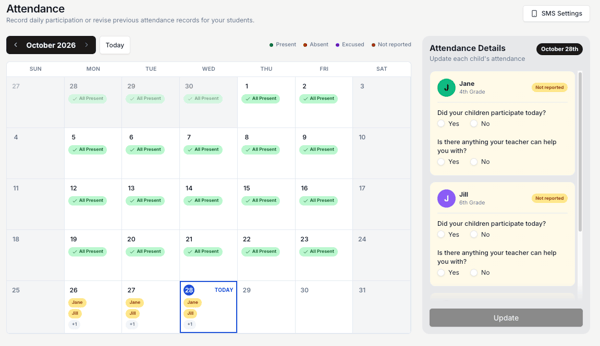
Note: If we don’t get an attendance response for one of your students by midnight, then that day’s attendance will automatically be recorded as an absence.
How Attendance Affects Enrollment
For your student to stay enrolled in good standing in the program, they will need to consistently submit a daily attendance response.
Stay informed: Review our Withdrawal/Repayment Policy for students who withdraw before the end of the school year.