.png?width=250&height=59&name=OpenEd_logo_noborder%20(1).png)
All OpenEd students are required to participate in state tests or submit a test opt-out form when available.
-
Review the Oregon Department of Education website for student assessment information.
-
Students are encouraged to use resources from Study Island and Exact Path to prepare for state tests.
Important information about state testing:
-
OSAS is administered in April/May on a secure browser and proctored online by a school-trained representative.
Assessment FAQs
OSAS
Q: What options do I have if I do not want my child to participate in the required science assessment?
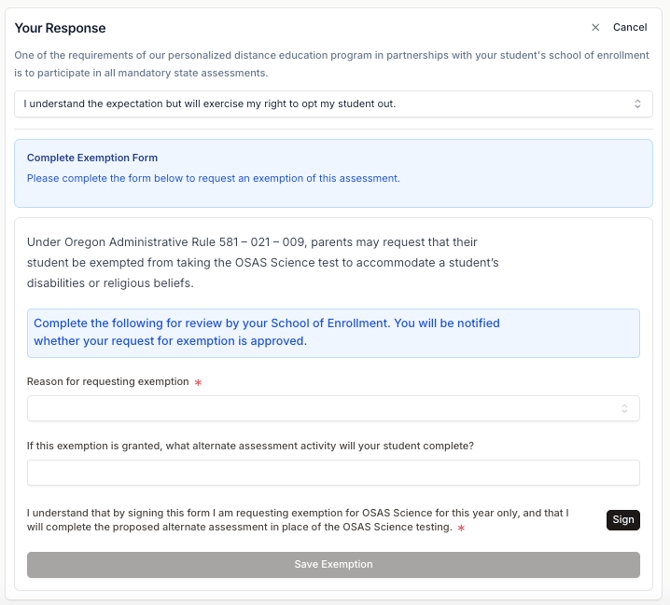
A: Under Oregon Administrative Rule 581 – 021 – 009, parents may request that their student be exempted from taking the OSAS Science test to accommodate a student’s disabilities or religious beliefs.
Through the OpenEd platform, you will asked to fill out an exemption form for review by your school of enrollment. You'll be notified whether your request for exemption is approved.
As part of this exemption form, you'll be asked to provide an alternate assessment activity that your student will complete instead.
Here's what that exemption form looks like:
Q: What kind of device will my student use for this online proctored test?
A: These tests must be accessed using a secure browser. View a list of acceptable devices.
Q: What can I do to help prepare my child for these assessments?
A: You can use this link to familiarize your child with the assessment's design, format, procedures, and item types.
Under Prepare for Testing, click on Sample & Training Tests.
Then, select the Continue as Guest option.
Q: When and how do I get the results?
A: When they're available, your student's results will be uploaded to the Assessments section of the OpenEd platform.