.png?width=250&height=59&name=OpenEd_logo_noborder%20(1).png)
OpenEd's marketplace offers your family a wide range of resources from the curriculum providers you know and love!
How It Works
While you're in the OpenEd platform, click on the Marketplace menu option from the lefthand sidebar.
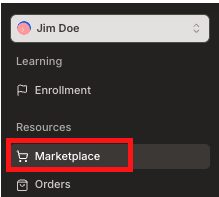
From there, you'll be able to browse our extensive list of open education resources.
Through the sorting options on the left side of the page, you can filter the marketplace by Resource Category, Grade Level, Subjects, Curriculum Alignment, Curriculum Type, or by specific Providers.
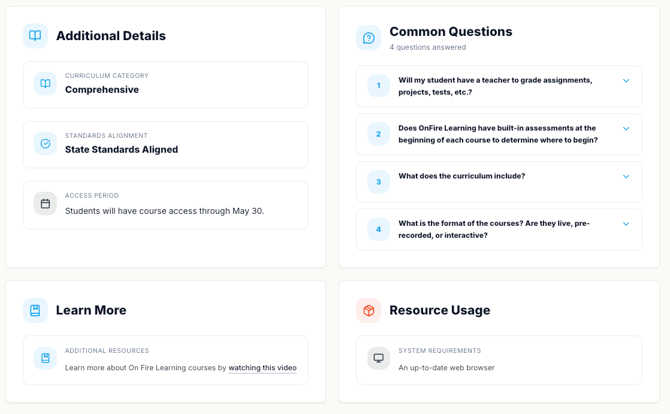
Click on a listing to view more info, like answers to frequently-asked questions or details about how long your student will have access.
Free Resources
These free resources are automatically included in your student's library:
- BrainPOP
- Exact Path
- Study Island
These free resources are available through our marketplace (you'll have to order them before they show up in your library):
- Adobe
- Canva
- Generation Genius
- Gizmos
- Legends of Learning
- Microsoft
- Musiquest
- Newsela
- Own It!
Connection To Your Student's Education Plan
When you add an item to your cart, you'll be asked to connect it to a subject on your student's education plan.

As long as the resource you're requesting relates to one of the subjects listed on the education plan and is approved by your student's teacher, you're good to go.
Processing Timeline
Typically, your order will be processed within 14 business days from the date you initially submitted it.
Preordered Items
During the Summer, you can preorder items for your student to use during the school year. (Your student will get access to these items once the school year starts.)
On the checkout screen, you'll see your item marked as preorder. That means that you can't start using your resource just yet – but you'll be able to soon!

How To View Your Orders
To see what resources you've already ordered, click on the Orders menu option.

On this screen, you'll be able to see some details about each order, including its status, what date you placed the order, and how many points it used.
Returning An Order
Most items in our marketplace are eligible for a 100% refund if you make your return request within 14 days of the date that you receive login access.
After 14 days, the amount of the refund will vary by resource.
To return an order, go to your Library and click on the item you'd like to return.
On the right side of the screen, you'll see a button labeled Return Resource.
Our team will take it from there!