
To supplement your student’s education, you can place direct orders for materials through Amazon and Rainbow Resource.
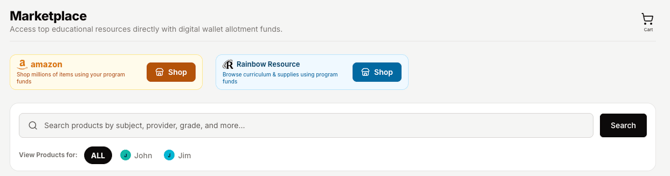
Under the Funds & Purchases section of your OpenEd platform, select the Marketplace option.
Click the Shop button to the right of the Amazon or Rainbow Resource logo to get started.
Keep in mind: In order to access your wallet funds, your student needs to be currently enrolled and demonstrating active participation in the program.
If you have a pending direct order when your student withdraws, that direct order will NOT be processed. We can only process direct orders for current, active students.
How It Works
At the top of your OpenEd marketplace, click the Shop button next to Amazon or Rainbow Resource.
You'll be able to shop directly through the vendor's platform.
Once you've selected your items, you'll be taken back to your OpenEd platform.
So our team has a sense of how your purchases relate to your family’s learning, you'll be asked to associate each item with a subject on your student's education plan.
For all-purpose items like printer paper, you can check off the General Supplies checkbox instead.
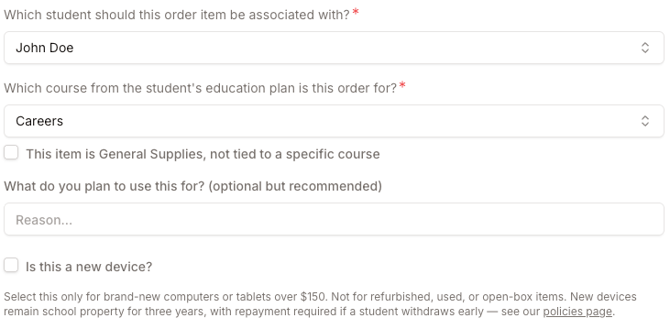
Tell us what you plan to use your item for!
It's optional, but a quick explanation gives us important context about how your order connects to your student's personalized education.
Last step: Select which of your students' wallets you'd like to associate your order with.
You also have the option to split each purchase between multiple students' wallets.
Just click the Add Another Wallet button, then enter how much of the total cost you'd like to be taken from each wallet.
We’ll send you an email letting you know as soon as your purchases are approved. Once they are, you’ll receive tracking info from Amazon or Rainbow Resource via email.
No Out-Of-Pocket Costs
The cost of your direct order will be deducted from your student’s wallet, so you won’t have to wait to be reimbursed.
After our team approves your order, your items will be shipped directly to your door.
What Qualifies As A New Device'?
When submitting a direct order, you'll see an optional checkbox labeled Is this a new device?
Please only select this option for brand-new computers, tablets, Kindles and iPads that cost over $150.
You don't need to check this off for refurbished, used, or open-box items.
Stay informed: New devices remain school property for three years, with repayment required if your student withdraws early. See our policies page for more details.
Processing Timeline
Typically, your order will be processed within 14 business days from the date you initially submitted it.
Once your order has been approved, the status will be marked as placed in the platform under the Orders tab.
Please note: The actual timeline for materials to be received is dependent on Amazon/Rainbow Resource shipping times for each item. Some items come as quickly as 2 days, and others can take up to two weeks, especially with Rainbow Resource orders.
Canceling An Order
If you need to cancel an order, click on that order’s info card from the Orders page.
If the order is still pending (meaning that it hasn’t been approved/fulfilled yet), you’ll see a Cancel Order button in the top right corner.
Returning An Order
If you would like to return a direct order, please reach out to our team here or chat with one of our support agents by clicking on the little convo icon in the bottom right corner of the OpenEd platform.
Please don't return your item directly to Amazon - work with our team instead so we know to reimburse your OpenEd wallet!
Keep in mind: Returns or refunds are only available if your items are damaged or defective when they're delivered.
Appealing A Rejected Order
If one or more items in your direct order is rejected by our staff, you'll get an email letting you know about your order's updated status.
On the Orders page of the OpenEd platform, you have the option to appeal our decision to reject the order.
You'll see an Appeal Decision button in the bottom left corner of the rejected order.
After clicking that button, you'll see a popup asking you to confirm that you would like to appeal the decision.
Once you submit your appeal, our team will review your explanation for why you believe the rejection should be reconsidered.
If we're able to approve the order, you'll get an email letting you know that your items are on the way.