.png?width=250&height=59&name=OpenEd_logo_noborder%20(1).png)
Split enrolled subjects are taken in-person at a public school, rather than through OpenEd.
With approval, students in grades 6-12 can take up to two on-site courses per semester at a public school.
Exciting news!
Starting with the 2026-27 school year, your student will have the option to split enroll with either a public school or a charter school!
Adding a split enrollment course to your student’s education plan will deduct $125 per semester from your student’s wallet. (A full year split enrolled course, taken over both semesters, will deduct $250 from their wallet.)
Please note: 6th graders can only participate in on-site split enrollment if they're going to a middle school. If their 6th grade class is in an elementary school, they do not qualify.
Important Distinction: Split Enrollment vs. Dual Enrollment
You may have come across the term "dual enrollment," which refers to homeschool or private school students who take some classes at a public school.
Split enrollment refers to public school students taking classes at more than one public school.
Since all OpenEd students in Utah are full-time public school students, they're not eligible for dual enrollment. Instead, students in grades 6-12 are eligible for split enrollment.
Requirements for On-site Split Enrollment
-
The public school must approve the split enrollment.
-
A split enrollment class must be a live, classroom-based course.
-
All split enrolled classes need to be part of – not in addition to – a student’s education plan.
Some high schools provide programs through universities or trade schools that, while physically located at a college, offer high school credit. If your student takes a class that meets this description, it will need to be added to their education plan.
Note: For the 2026-27 school year, OpenEd students are not able to participate in any SOEP/SEATS courses (including split enrolled SOEP/SEATS courses).
How to Register for On-site Split Enrollment
You are responsible for registering your student through your local public school. Please use this Split Enrollment Form as a helpful tool for registering your student for split enrollment.
When working with the public school, let them know your student is a full-time online public school student and would like to come on-site for one or two classes.
It’s best not to mention OpenEd, since we're not a school; doing so can cause confusion for school administrators who aren't familiar with our program.
Your district might assume that you're asking to enroll as part of the Statewide Online Education Program (SOEP); if they do, please let them know that that's incorrect.
Please note: Not all school districts allow split enrollment, nor are they required to.
Paying School Fees
Some districts may require a participation fee to attend in addition to (not a part of) the $125 that’s deducted per split enrolled course per semester from your student’s wallet.
Great news - these fees are reimbursable using your wallet funds!
When filling out the school’s split enrollment form, please keep in mind that you’ll need to list your student’s school of enrollment as the school that your student is enrolled in (you cannot list OpenEd as the school).
If the form asks for the school type, please put Online (not Charter or Other).
Submitting Your On-site Split Enrollment Details
After you’ve registered your student for an on-site split enrollment class at a public school, the next step is to submit the details of that class through the OpenEd platform.
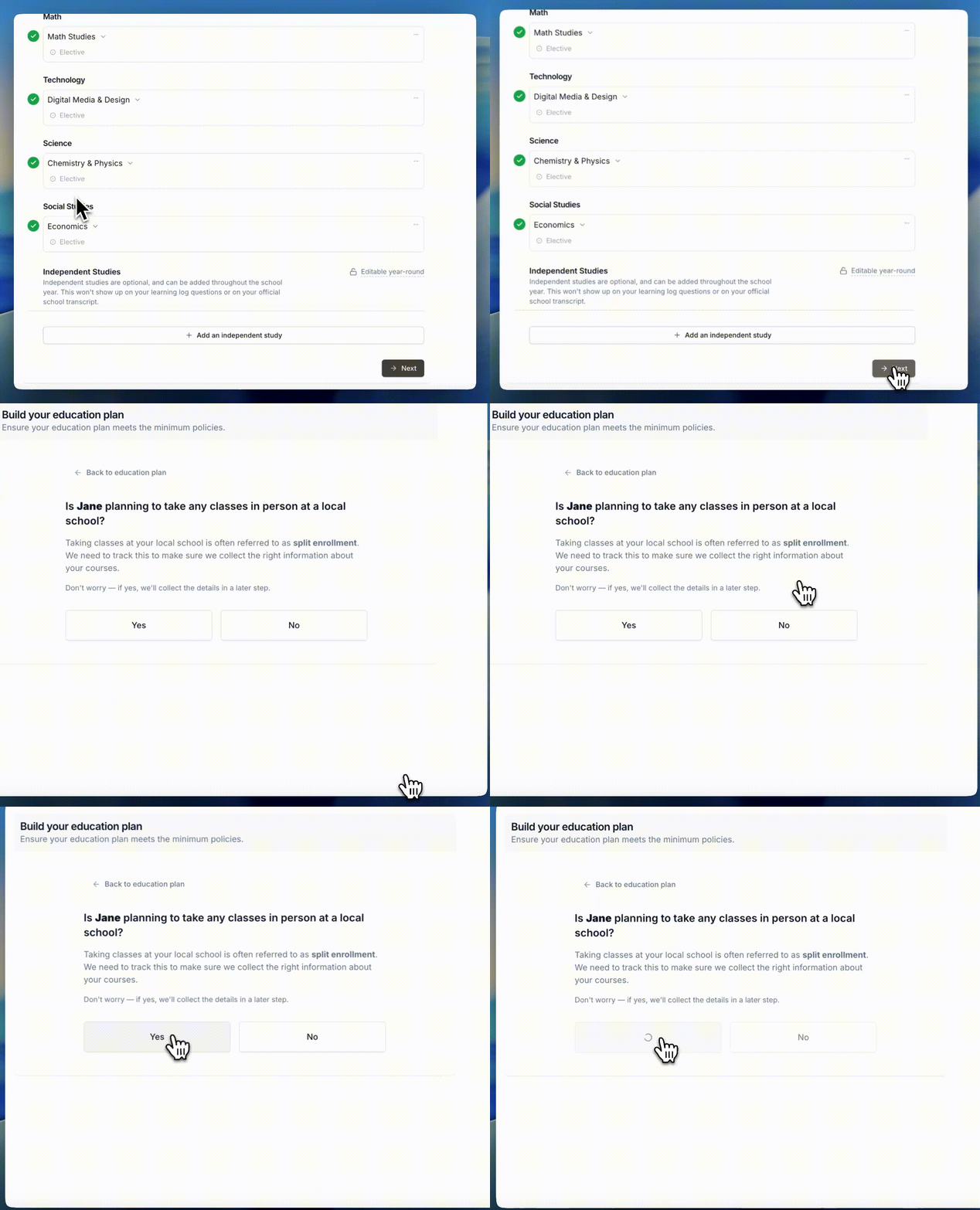
When you're filling out your student's education plan, we'll ask you whether they're planning to take any classes in person at a local school:
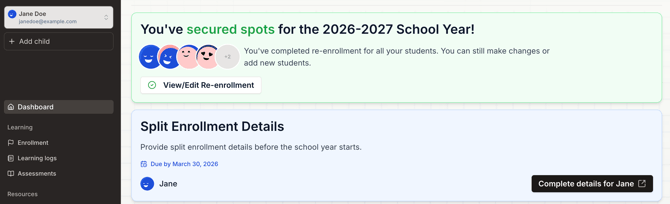
If you say yes, then you'll see this banner appear on your in-platform dashboard:
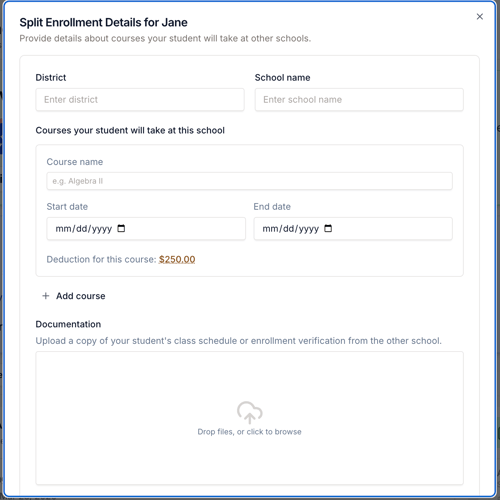
When you click on the Complete details for [your student] button, you'll see a popup asking for a few details about your student's class (like the course name, the start and end date, and a copy of your student's class schedule):
Once you send those details over, you're all set!
Important:
If you add or drop a split enrolled class, please let us know by emailing us here. We'll help you get your information updated in our platform.
Changes To Split Enrolled Subjects – What’s Allowed & What’s Not
Once the school year begins, you can’t make changes to a split enrolled subject. The course information must remain consistent for the full year.
Other Things To Keep In Mind
-
Released Time LDS Seminary and after-school extracurricular activities are NOT considered split enrollment and are available to all students in addition to their education plan (but not as a part of it).
-
Students may participate in their local school's extracurricular, school-sponsored activities at the discretion of your school of enrollment. If a team or activity requires enrollment in a specific class in order to participate, that split enrollment class would need to be part of the student’s OpenEd schedule.
-
You're responsible for any fees charged by your local school for split enrollment – but those fees are eligible for reimbursement through OpenEd.