.png?width=250&height=59&name=OpenEd_logo_noborder%20(1).png)
Your student’s participation in Oregon’s statewide assessments helps to ensure that all learners have access to a high-quality education. Statewide testing provides valuable information that helps improve instruction, allocate resources, and support student success.
These assessments are based on the Oregon State Standards and the WIDA English Language Development Standards, which define what students should know and be able to do at each grade level. To learn more, please visit the Oregon Department of Education Statewide Assessments page.
Tech Recs
We recommend utilizing your program funds to acquire a Windows device for virtual testing.
In the past, parents have had some difficulties using Chromebooks or Macs for virtual tests.
How To Find Assessment Info In-Platform
After logging into the OpenEd platform, click on the Assessments menu option from the lefthand sidebar.
On that page, you'll see a tile of information for each assessment that your student needs to take to remain in compliance with the program. Click on a tile to see an expanded view of that info.

Each tile includes a short description, the dates of the assessment's testing windows, and details on whether your student already has a testing date scheduled.

After your student's assessment results are ready, we'll upload them on this same page. It's a one-stop shop for everything you need to know!
Participation Expectations
OpenEd students in Oregon are encouraged to participate in Oregon's statewide assessments.
For some assessments (but not all), you have the option to elect not to participate - you can update your student's participation status directly through our platform.
Just click on an assessment's info tile, then scroll to the bottom; you'll see a dropdown menu that lets you choose whether your student will participate.
As long as the testing window hasn't passed, you can change this response at any time.

Rescheduling Your Student's Testing Time
If you need to reschedule your test date, click on the link in the confirmation email you received after you signed up.
In that message, you should see a Reschedule button that'll let you shift your schedule around.
Can't find your confirmation email? No worries! You can use the initial sign-up link to choose a new time that works for you.
Assessments That Affect Oregon Students
Important information about state testing:
-
OSAS is administered in March/April/May on a secure browser and proctored online by a school-trained representative.
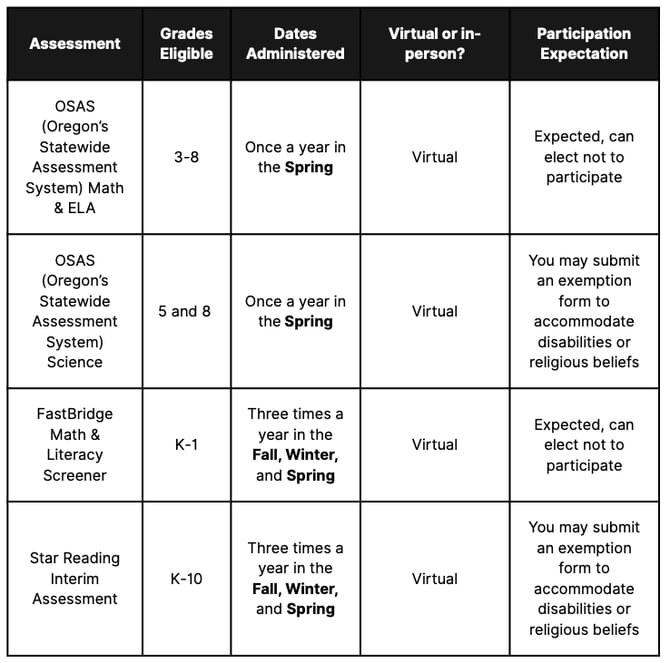
Take a look at the table below for an overview of Oregon’s assessments for the 26-27 school year and which grades they affect.
Depending on state requirements, this information may be adjusted before the start of the school year.