.png?width=250&height=59&name=OpenEd_logo_noborder%20(1).png)
Your student’s participation in Washington's statewide assessments helps to ensure that all learners have access to a high-quality education. Statewide testing provides valuable information that helps improve instruction, allocate resources, and support student success.
Meet your OpenEd test administrator team!
Tech Recs
We recommend using a Windows device for virtual testing.
In the past, parents have had some difficulties using Chromebooks or Macs for virtual tests.
What To Expect From In-Person Assessments
Let's make sure your testing experience is super easy!
In Spring 2027, we'll be coming to these locations for in-person testing.
Don't see your area on this list? Let us know here so we can update our location roadmap to accommodate you!
OpenEd will work closely with our school partners and local testing providers to coordinate assessment opportunities as close to families as possible. Our goal is always to make the process clear, organized, and low-stress for both students and parents.
You'll receive regular communication from our team throughout the assessment process, including important dates, locations, scheduling details, and next steps.
Whenever possible, assessment locations and testing windows will be shared at least one month in advance so families have time to plan.
OpenEd will directly manage the assessment experience, and members of our team will be available on-site during testing to help support students, families, and proctors.
If questions come up at any point along the way, our team is always here to help!
How To Find Assessment Info In-Platform
After logging into the OpenEd platform, click on the Assessments menu option from the lefthand sidebar.
On that page, you'll see a tile of information for each assessment that your student needs to take to remain in compliance with the program.
Each tile includes a short description, the dates of the assessment's testing windows, and details on whether your student already has a testing date scheduled.
After your student's assessment results are ready, we'll upload them on this same page. It's a one-stop shop for everything you need to know!
Participation Expectations
OpenEd students in Washington are encouraged to participate in Washington's statewide assessments.
You have the option to elect not to participate - you can update your student's participation status directly through our platform.
Just click on an assessment's info tile, then scroll to the bottom; you'll see a dropdown menu that lets you choose whether your student will participate.

As long as the testing window hasn't passed, you can change this response at any time.
Rescheduling Your Student's Testing Time
If you need to reschedule your test date, click on the link in the confirmation email you received after you signed up.
In that Calendly message, you should see a Reschedule button that'll let you shift your schedule around.
Can't find your confirmation email? No worries! You can use the initial sign-up link to choose a new time that works for you.
Assessments That Affect Washington Students
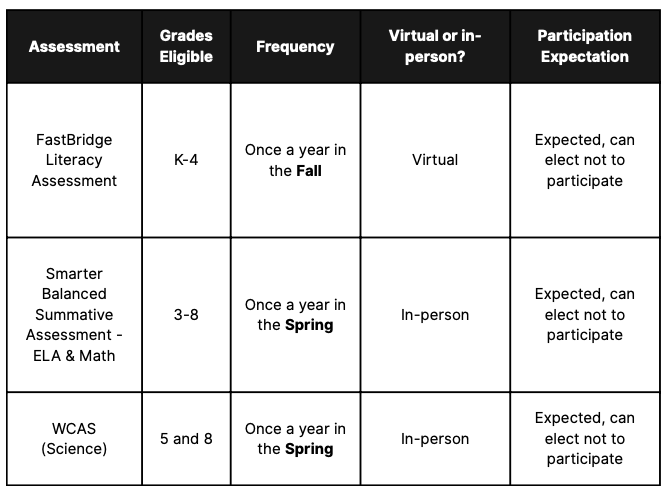
Take a look at the table below for an overview of Washington's assessments for the 26-27 school year and which grades they affect.
Depending on state requirements, this information may be adjusted before the start of the school year.