.png?width=250&height=59&name=OpenEd_logo_noborder%20(1).png)
While we’d be sad to see you leave the program, our team’s top priority is empowering you to make the educational decisions that are right for your family.
If you’ve found that OpenEd isn’t the correct fit for your student, you can initiate withdrawal directly through our platform.
Stay informed: Make sure to read our Withdrawal/Repayment Policy before you start the withdrawal process!
Initiating Withdrawal
After logging in, click on the Enrollment menu option from the lefthand sidebar.
In the top right corner of the page, click on the Action button.
Then, select Withdraw.
Depending on how many resources you’ve ordered, you may be required to pay back a certain amount.
You can find this amount listed under the Withdrawal Calculation section of the page.
You'll receive an invoice for the fair market value of your resources (discounted by the total number of months that your student was enrolled).
Below that section, you'll also find a Detailed Payback Breakdown outlining all of your reimbursements and direct orders.
Important: Your final required payback amount will be calculated when your request to withdraw is approved.
Why do I have to pay anything back?
The full program allocation is available to students who remain enrolled for the entire program year.
If you withdraw your student before the end of the year, your payback amount will be discounted by the total number of months that your student was enrolled.
How is my payback amount calculated?
Your payback amount is the fair market value of your resources that you’ve already ordered minus your participation discount.
Your participation discount is based on the total number of months that your student was enrolled.
At the bottom of the withdrawal form, you’ll be asked to fill in your email, phone number, and a reason for why you’re withdrawing your student.
Then, you’ll be asked to confirm that you’ve read our Repayment Policy.
Once you’ve finished those steps, click Start Withdrawal.
That will send your withdrawal over to our team for approval.
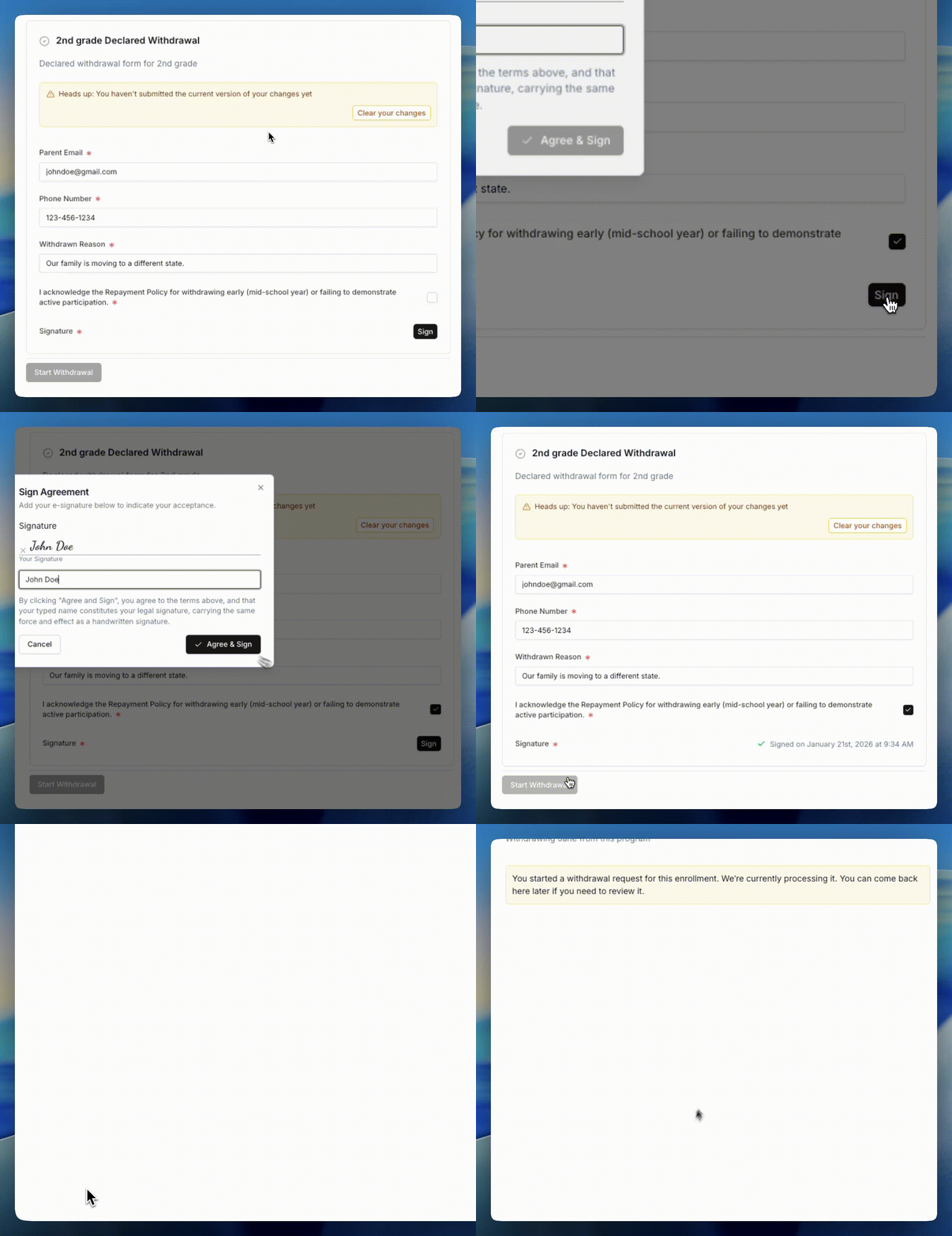
We’ll let you know as soon as we approve your withdrawal request.
Still on the fence about withdrawing? Please reach out to our team at help@opened.co! We’d love to connect with you about how we can better support your student’s needs.